
Your numbers
Renew an expired number
An expired number stays on your Profile for 30 days so you can renew it: the primary number through your subscription, an extra number with coins.
Before you start
- A number showing Expired on your Profile
Steps
1Find the expired number
On your Profile the card reads Expired. Calls and messages from it are blocked until it is renewed.
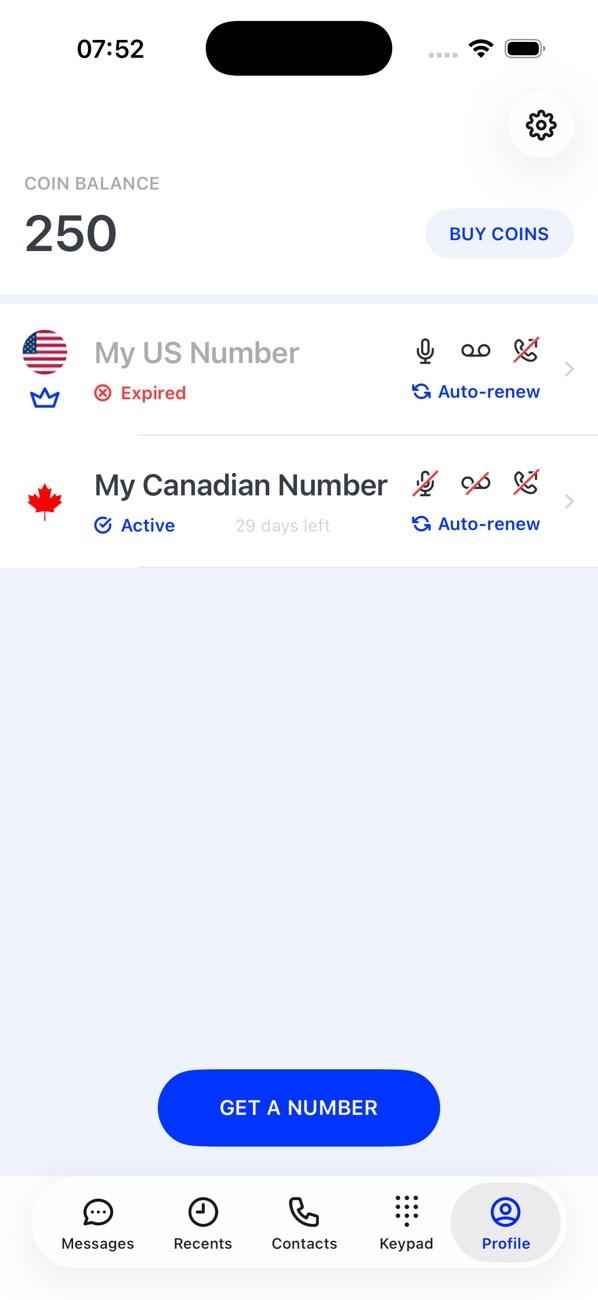
2Tap the card
For your primary number the subscription screen opens: choose a plan, or tap Restore if your subscription is still active in the store. For an extra number the coins screen opens: pick a term (7 days, 30 days, 90 days or a year) and pay from your balance, buying coins first if you need to.
3If the number has gone
Before renewing, the app checks the number is still available. If it is not, it asks This number is no longer available. Do you want to get a new phone number? Tap yes to choose a new one.
4Renewed
The card returns to Active with its new days remaining, and Messages, Keypad and Recents work again for it.

Good to know
- A number left expired for 30 days is deleted and released, and cannot be brought back.
- Turn on Auto Renewal, and keep coins in your balance, to avoid expiry in the first place. The app warns you by notification before a number expires.